Navigation: Concepts >
Domains


|
Navigation: Concepts > Domains |
|
Domains sound complicated and scary, but the concept is simple. A Domain is simply an object that defines properties that other objects can "inherit". In effect, allowing you to organize any type of object into classes that share properties. If an object doesn't have value for a property, ModelRight will look to see if the it's Domain has a value for the property. You can think of Domains as a way to classify your objects based on the properties they have in common and then define those properties in one place - the Domain. For example, you might have lots of Columns in your Model that are some type of ID (Customer ID, Employee ID, etc...). Instead of having to assign common properties to them individually (a datatype of INTEGER, NOT NULL, etc..), you could create a Domain named ID, assign to it the common properties and then assign it to all of your ID Columns. That way you are assured consistency of those properties across all of your ID Columns and you can easily change their properties simply by changing the ID Domain. So Domains effectively provide a way to classify your objects, organize their properties, enforce consistency of property values, and easily make changes across the class of objects. Of couse, you can add arbitrary level of Domains to suit your desired meta-data organization.
ModelRight always provides a "default" Domain for any object that uses Domains. Thus give you a way to set Model-wide defaults for any property - JUST by setting it on the default Domain.
To see all the different types of Domains that ModelRight supports, click the  tab at the bottom of the Model Explorer. BTW, a red exclamation point
  is used throughout ModelRight 3.6 as a symbol for a Domain. We provided a Domain for any type of object for which we thought it would be helpful (
 Table Domains for Tables,
  Column Domains for Columns, etc...), but let us know if we you would like any others!
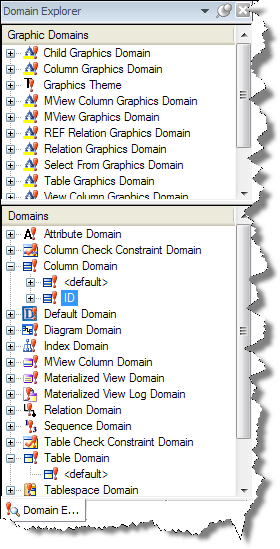
How Domains Work
An easy to visualize example is a  Diagram Domain. If you select a Diagram in the Diagrams section of the Model Explorer and then look at its properties in the Property Browser, you will see that it Inherits from the <default> Diagram Domain. Various <default> Domains are automatically created with every Model and can't be deleted. They define the default properties for all objects of the Domain's type. i.e. the <default> Diagram Domain defines the default properties for all Diagrams. If you click on the "Inherit" link, the <default> Diagram Domain will become the currently selected object, and its properties will now be displayed in the Property Browse pages. If you then change the Background Color to light blue, then all of you Diagrams will now have a light blue background - since they all inherit this property from the <default> Diagram Domain. If you create a new Diagram, it will also have a light blue background - since it will be initialized to inherit its properties from the <default> Diagram Domain. If you change the Background Color property of the <default> Diagram Domain to red, then all your Diagrams will have a red background, etc...
An object "overrides" an inherited property when you modify that property on the object. So, if you again select a Diagram in the Diagrams section of the Model Explorer (or by navigating back  to the one you had just selected) and change the Background Color of the Diagram to grey, you will have created a "local" property on the Diagram that "overrides" the inherited property. Now this Diagram will no longer use the inherited property and any changes made to the <default> Diagram Domain's Background Color won't effect this Diagram. If you want to remove this local property/override, you can select the
  tab in the Property Browser and click the
  icon next to the Background Color property. By the way, you can't delete the <default> Diagram Domain's Background Color property since ModelRight enforces the fact that some value is needed for this property - hence this property doesn't even appear on the Reset page for the <default> Diagram Domain.
Not only can a regular object inherit from a Domain, but a Domain can inherit from another Domain. i.e. a Diagram Domain can inherit from another Diagram Domain. This allows you to create a classification scheme as a hierarchy of Domains with each level contributing more properties and effectively adding more specificity.
Page url: https://www.modelright.com